Pack your files.
Free up space.
A lightweight Windows archiver.
Drop files, choose a destination, compress or extract.
1.2.0 · Windows 10 / 11 x64 · English · Download and run
EXE 1.22 MB
No account, no ads. Your files stay on your computer.
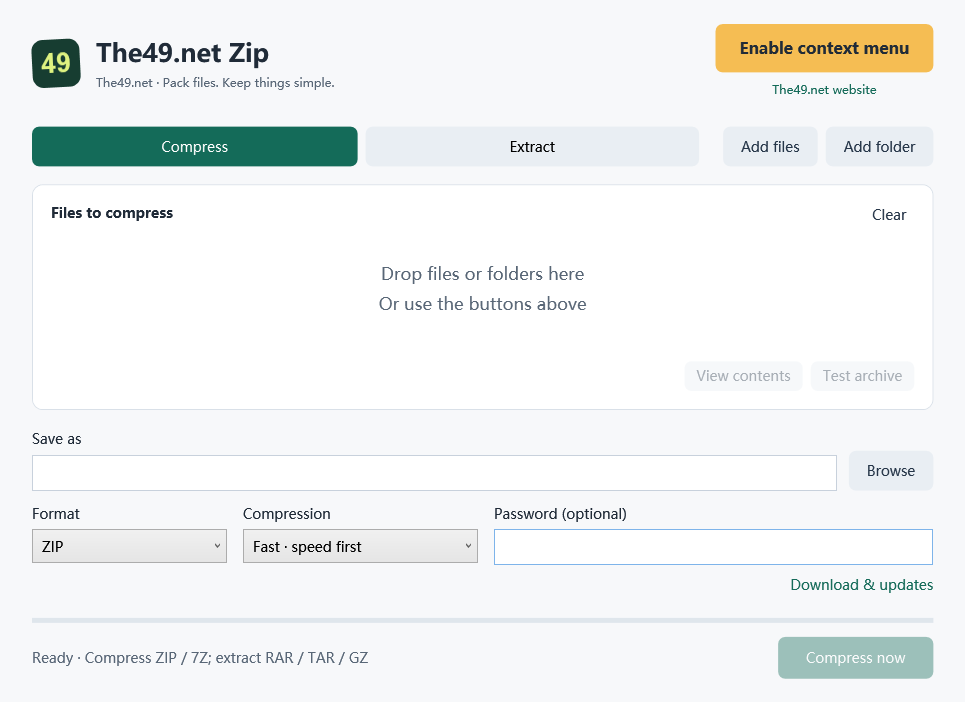
Drop it in.
Drag files or folders into the app. Dropping one archive switches to extraction.
A shortcut on right-click.
Use the yellow button to enable the branded “The49.net Zip” context menu. Compress ZIP or 7Z, or extract to a new folder.
The essentials, included.
Passwords, contents, integrity tests, progress and cancellation. Extraction creates a new folder to avoid overwriting files.
The formats you use most.
ZIP is easy to share. 7Z offers higher compression and stronger encryption.
Fast mode is the default; balanced and smallest-size modes are also available.
| Format | Compress | Extract |
|---|---|---|
| ZIP | Included | Included |
| 7Z | Included | Included |
| RAR / RAR5 | Local WinRAR required | Included |
| TAR / GZ / TGZ | — | Included |
RAR creation uses your installed WinRAR, or a Rar.exe you select. No RAR encoder is bundled. WinRAR provides its own trial and license. Visit WinRAR
Before you start,
a few useful details.
Download Windows EXE 1.2.0How do I use the download?
Open the EXE directly. No installation or unpacking is needed. The engine and icon are included. Separate Chinese, English and Spanish EXEs are available.
Why is our icon missing from “Compress to…”?
“Compress to…” is built into Windows. Use the yellow Enable context menu button. If an older menu is enabled, use Enabled · Manage menu and choose to update. On Windows 11, open Show more options to find The49.net Zip.
How do downloads and updates work?
Download & updates checks your version against the latest official release. You can open the download page in your language. Replace the old EXE with the new one; updates are not installed automatically.
Which encryption should I choose?
7Z uses AES-256, hides file names and supports Unicode passwords. ZIP uses compatibility-focused ZipCrypto with ASCII passwords. RAR supports Unicode passwords, but double quotes are not allowed.
What if I move or remove the app?
After moving the EXE, open it at its new location and update the context menu. Remove the menu using Enabled · Manage menu before deleting the app. Default file associations are not changed.
Are my files uploaded?
No. Compression, extraction and tests run locally. Update checks read only the official version number and do not send files. Website links open your browser.
Verify your download
EXE · SHA-256
c6379d3bfbba47f30c16e59d0b0c6e3573b4c2052822b68e3797c4b85979b25dCompression engine: 7-Zip 26.03. License and source links are included with the app.